
Aperture: a fast local image browser for Windows
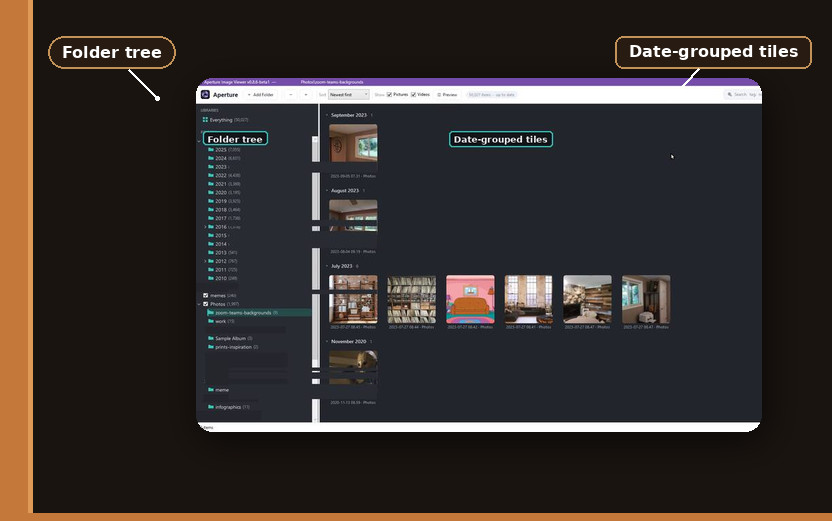
Aperture Image Browser is a free Windows app for the folders File Explorer gives up on: a Camera Uploads pile, years of screenshots, a dump of stills and clips that never got sorted. Explorer crawls those folders; Aperture indexes them on your machine and stays there: nothing is uploaded, and there is no telemetry.
The GitHub project holds the first public exe; its readme starts with setup and how the folder tree sits next to the thumbnails.
The first scan is the slow one
The first scan is the slow one: Aperture walks the folder, writes a persistent local index, and fills a thumbnail cache, and you wait on that pass. Later visits use that index and cache, and the grid stays usable when the folder has tens of thousands of files. The cache lives under %LocalAppData%\Aperture (a folder Windows keeps for this app on your account).
Every included folder in one view
You can open an Everything library — Aperture’s combined view of all the folders you include (no relation to the voidtools search tool) — when you want every included folder in one grid. A normal folder tree sits beside it for the days you already know where you are going. The grid is grouped by date, and only the tiles on screen are built, so a 50,000-file folder still scrolls.
Search uses Gmail operators
You can tag files and attach notes, then find them again from the search box. Search is Gmail-shaped. Operators like tag:, note:, and is:video work the way Gmail’s search bar does, so you type those prefixes and the grid keeps the files that match. Multi-select, a full-screen quick-look, and an inspector sit on the selection, so you can highlight many tiles, open the current file large, and see tags and notes without leaving the grid. Thumbnails cover stills and video, and dragging a tile out of the window is a real file: you drop it onto a mail compose window or onto a folder.
The build is signed by Funcular Labs; treat it as a beta you run on the PC that already holds the files. v0.7.0-beta1 was the first public build, on GitHub. Put the .NET 10 Desktop Runtime on that PC, then run the exe there.