
Markdown Midget has themes now
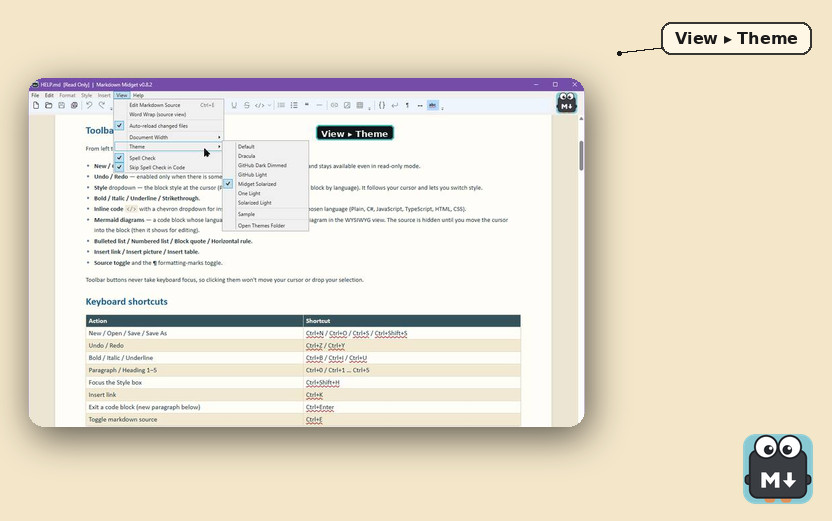
There is a Theme menu in Markdown Midget now. Markdown Midget edits markdown on Windows — WordPad menus, a .md file on disk, nothing uploaded. Open View ▸ Theme and pick a palette, and the surface you are typing in recolours immediately while Markdown Midget remembers the choice.
What the formatted view looks like lives in the Windows editor post; GitHub holds the exe this menu ships in.
The markdown source view follows along, and so do mermaid diagrams (the charts in the document), so source and diagrams use the same palette as the document. The menu bar, toolbar, and status bar keep their Windows colours, so they do not follow the palette you picked. Printing ignores the theme, so paper stays light even if the editor is dark.
Seven palettes, one of them ours
The built-ins are Default, Dracula, GitHub Dark Dimmed, GitHub Light, One Light, Solarized Light, and Midget Solarized. Stock Solarized Light sits below WCAG AA (the common bar for readable text contrast) on body text on purpose. Midget Solarized spends that difference on readable prose, calmer headings, and table stripes you can actually follow. Open Midget Solarized and body text is easier to read, headings are less loud, and table rows alternate so you can follow a line across.
Write your own in the themes folder
You can write your own:
- Open View ▸ Theme ▸ Open Themes Folder
- Copy the commented
sample.css - Rename it
- Change the colours
The new name appears in the View ▸ Theme menu without a restart, so you can open the menu and pick the renamed file immediately. Anything in custom\ is yours and is never overwritten. The built-ins live one folder up and refresh on update, so do not edit those files and expect the edits to last.
A failed theme stays in the menu
A theme is checked before it is used. One that fails stays in the menu but you cannot select it, and a tooltip names the line and the reason.
- It may not fetch off the machine (
url(https://…)is out). - It may not select on what an attribute contains.
- It may not run script.
The middle rule refuses some harmless sheets too, on purpose: the harmless selector and the harmful one look the same on the page, and greying the theme out is how the app refuses both.
A new document is a new window
File ▸ New opens a new window, so a second editor appears instead of replacing the document you already have open. Help ▸ What’s New lists the notes newest first, so the latest change sits at the top of that list when you open it.
Pick up v0.7.0 for the palettes and View ▸ Theme ▸ Open Themes Folder. If a sheet you dropped in custom\ never appears in that menu after you rename sample.css, that tag is where to file it.