
Markdown Midget updates keep your place
If you apply an update mid-edit, Markdown Midget brings the window back with the document still open. Markdown Midget is a WordPad-style editor; it keeps a formatted document and a .md file together so you can write without switching apps. You still have the view you were in, instead of an empty window that asks you to reopen the file.
The editor introduction covers the formatted view, the WordPad menus, and the .md file on disk; the GitHub project is the signed exe.
Coming from 0.7.0 or earlier still uses the old updater, so that one hop will not carry the document into the new window. The new version opens, but the file you were editing is not in the window. Every later update carries the document, so after that first jump from 0.7.0 the file is in the window again.
Other windows offer the installed update
Updating from one window replaces the program on disk. Other open windows keep running the previous version until they restart. They now notice: the menu item Help ▸ Apply vX.Y.Z Update appears in each old window and reopens it, same document, same view, on the version already installed. Nothing is downloaded; the item appears on installed copies only. A portable exe never changes out from under a running window, so the item never appears there.
The About box names both versions
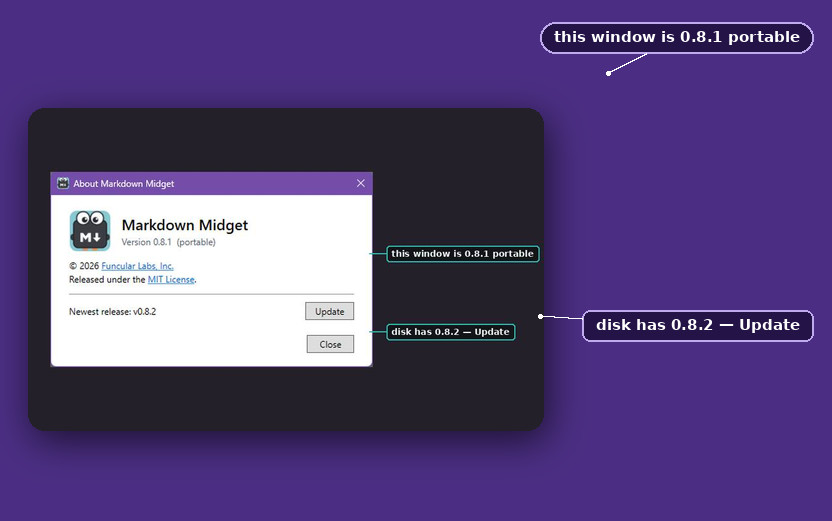
The About box used to show only the running version, and when the disk has moved ahead a second line stays up: installed on disk is X, and the window you still have open is still running Y.
Word’s dictionary imports one way
Settings can import Word’s CUSTOM.DIC — Word’s custom dictionary file — one way into Midget, and Word’s file is only ever read. Writes to Midget’s dictionary now merge with what is on disk, so a word added in one window is not erased when an older window adds a different word later. That bug was always wrong, and it is intolerable once an import can add hundreds of words at once.
The updater work is in v0.8.0. If an installed copy never grows Help ▸ Apply vX.Y.Z Update in a window that is still on the previous version, open that tag and name the version the About box reports.